
Index: Business Phone Number
Pinger, IncBusiness
3.883.00 Reviews
- Version
- 13.25
- Installs
- 50.00K
- Age Rating
- Everyone
Screenshots



Our Review of Index: Business Phone Number
 Analysis by Appyee
When work calls start landing on the same phone as family, friends, and delivery updates, even a simple callback can become awkward. I like the idea behind Index: Business Phone Number: give work conversations a separate place without carrying a second handset. It is a business communication app from Pinger, Inc, and its appeal is practical rather than flashy. The real question is whether a second number can make everyday client work easier without adding another system to manage.
From a busy inbox to a more orderly workday
I look at a separate work number as the first step in a larger routine: deciding what deserves a quick reply, what needs a callback, and what should wait until I’m back at my desk. The section that follows traces how I’d move a customer conversation through that routine, including the small habits that make a handoff clearer instead of creating another inbox to monitor.
Starting with the problem, not the app
A separate work number is most useful when people need to reach you but should not automatically get your personal number. Think of a freelancer taking inquiries from prospective clients, a home-service business arranging visits, or a small shop answering questions after customers have found it online. In each case, the incoming call matters, but letting work spill into every part of a personal phone can quickly feel intrusive.
That is the kind of situation where I would consider Index. It is free to install, rated for Everyone, and aimed at organizing work communication and customer interactions. Its average rating is 3.8 from around 200 ratings, with over 50,000 installs. Those figures suggest a modest, established audience rather than a tool that has become an unavoidable standard, so I would try it against my own routine rather than assume it suits every business.
The app’s version is 13.12.1, and it requires Android 9 or later. I would check that requirement before planning a work line around an older Android phone. It is also available on iOS, which matters if the person handling calls switches between platforms or works with someone who uses a different kind of phone.
Choosing a number and setting expectations
Getting started with Index: Business Phone Number is a breeze. The app is available for both Android and iOS, so you can download it from the App Store or Google Play without a hitch. Once installed, the setup process is straightforward. You're prompted to create an account, and then you can choose your new business number from a selection of available options. It's surprisingly user-friendly, and I was up and running in no time.
One thing I particularly appreciated was the ability to select a number with a local area code, which adds a personal touch when dealing with clients in specific regions. The app's interface is clean and intuitive, making navigation a piece of cake even for those who aren't tech-savvy.
Before choosing, I would think about where the people calling you are located and what impression you want the number to make. A local area code can feel familiar to nearby customers, but it is not a substitute for clearly identifying your business when you answer. If you serve people across several regions, choosing a number just because its area code looks local may not reflect how you actually operate.
Handling a customer conversation from first call to follow-up
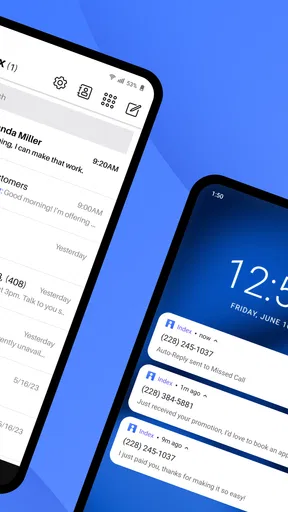
For a realistic day-to-day example, imagine a customer calling while you are helping someone else. The useful workflow is not merely answering: you need to see who contacted you, catch the reason for the call, and follow up without losing the details among personal messages. A dedicated work number gives that conversation a clearer boundary from the start. If you cannot pick up, voicemail transcription can make it easier to judge whether the message needs an immediate response or can wait until a break.
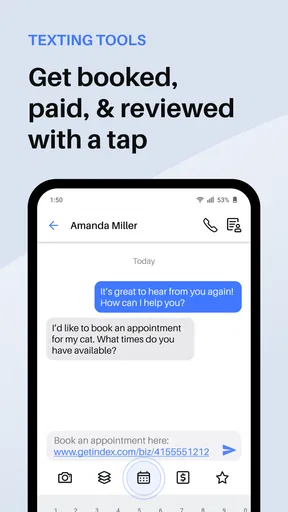
Another standout feature is the voicemail transcription. I can't tell you how much time this saved me. Instead of listening to voicemails, you get them transcribed directly to text. It's like having your own personal assistant jotting down messages for you. Plus, you can respond to messages directly from the app, streamlining your workflow.
Transcription is most helpful as a quick triage tool, not as a perfect record. Names, addresses, appointment times, and other details are exactly the parts I would double-check against the audio before acting. That small habit can prevent the convenience of reading a message from turning into a mistaken callback or a missed appointment.
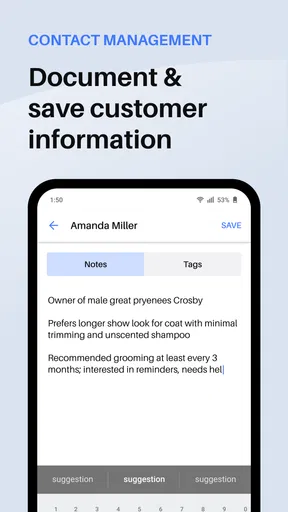
For a sole operator, the next step might be answering a text, returning a call, or noting what the customer asked for before moving on to the next job. The app's ability to categorize calls and messages by client or project can help keep those interactions easier to revisit. I would use a consistent naming approach, such as a client name or a short project label, rather than inventing a new format for every conversation. The benefit depends on maintaining that organization; otherwise, categories become another layer to search through.
For someone who receives only occasional work calls, this may be more structure than necessary. A second number is worthwhile when it solves a recurring boundary or tracking problem, not simply because a separate business line sounds professional. If you rarely need to distinguish work from personal conversations, your usual phone setup may already be enough.
When another person needs to take over
Hand-offs are where a small business communication workflow can get messy. If a customer calls while you are unavailable, a colleague may need enough context to continue the conversation. A separate work channel can make it easier to identify which messages belong to the business, but categorizing a conversation is not the same thing as establishing a shared team process. I would agree with anyone who helps answer the phone on how to label follow-ups and who is responsible for replying, rather than assuming the app itself will prevent duplicate responses.
The app's organizational tools are most valuable when one person owns the inbox and uses them consistently. A two-person operation might agree that one person handles new inquiries while the other manages booked appointments, then use client or project categories to keep those threads easy to find. That is a practical routine, but it still depends on clear communication between people; a label cannot tell a teammate that a callback has already been promised unless the team keeps that status current.
If you need a central reception queue, detailed assignment controls, or a formal record of who handled each customer, I would compare this approach with a dedicated business phone or customer-support platform before committing. Index makes more sense as a convenient work number on a personal smartphone than as a replacement for a fully managed call center.
Where it fits beside ordinary alternatives
The usual alternative is to give customers your personal number. That costs nothing extra in setup, but it blurs work and private life, and changing numbers later can mean updating customers and listings. A second physical phone creates a firmer boundary, yet it also means carrying, charging, and keeping track of another device. Index occupies the middle ground: one handset, with a separate business number managed through an app.
That compromise is particularly appealing to freelancers, independent tradespeople, consultants, and small businesses where one person handles most customer contact. It is less compelling for a company with several staff members sharing calls, or for a team that already relies on a full phone system with centralized routing and reporting. In those cases, the extra operational controls of a purpose-built service may matter more than the convenience of keeping everything on one phone.
There is also a cost detail to keep in mind. The app is free, but it includes in-app purchases ranging from $24.99 to $199.99 per item. I would review the current purchase options in the app before building a workflow around it, and decide what I actually need before paying. The free download makes it easy to explore, but it should not be treated as proof that every useful part of the service has no cost.
Privacy, compatibility, and practical limits
In today's digital age, privacy is paramount, and Index: Business Phone Number takes this seriously. The app ensures your personal number stays private, giving you peace of mind when communicating with clients. The app employs robust encryption, keeping your calls and messages secure. I felt confident knowing that my business communications were protected.
Even with a separate number, I would still be deliberate about what information I send in a message and who can access the device itself. A work number helps keep customer contact distinct from personal contact, but it does not remove the need to secure the phone or handle client information thoughtfully. If you are dealing with sensitive or regulated information, check that the app and your wider business process meet the standards your work requires rather than relying on a general-purpose phone app alone.
One of the app's impressive aspects is its compatibility with other tools you might already be using. It integrates seamlessly with your existing contact list and calendar, allowing for easy scheduling and contact management. Plus, it syncs effortlessly with email clients, ensuring all your communication channels are in sync.
For those using customer relationship management (CRM) systems, the app offers integration options that can enhance your workflow. This versatility makes it an attractive choice for business professionals across various industries.
For a small operation, the practical question is whether those connections reduce repeated work in your particular setup. I would test a simple sequence before relying on it: save a work contact, arrange a follow-up, and check whether the information appears where you expect it. If your everyday process depends on a specific CRM, calendar, or email tool, verify that the integration supports the exact hand-off you need. A broad claim of compatibility is less useful than knowing that your own routine works from end to end.
Another limitation is that an app-based work number still depends on your smartphone being part of the process. If you do not want business calls arriving on the device you carry outside work hours, a separate handset or a more formal phone service may suit you better. Likewise, anyone who needs a robust shared inbox should confirm that the app's approach matches their team before using it as the only point of contact.
My Personal Take
After spending some quality time with Index: Business Phone Number, I have to say, it’s a solid addition to my toolkit. The convenience of having a separate business number without needing another device is a real boon. The app's features are thoughtfully designed, focusing on practicality and efficiency.
Whether you're a freelancer, a small business owner, or just someone who needs to keep their work and personal life separate, this app has got you covered. The peace of mind that comes from knowing your personal number is private, alongside the organizational benefits, makes this app worth checking out.
In conclusion, if you're on the hunt for a reliable business phone solution that's both affordable and effective, give Index: Business Phone Number a shot. It's like having a personal assistant right in your pocket, ready to help you stay connected and organized.
My recommendation is to start with one specific problem you want the second number to solve: separating client calls, keeping voicemails manageable, or sorting conversations by project. Try the app with that routine first, and pay attention to whether you can reliably find a message and follow up when promised. If it reduces those small daily hassles, it is doing useful work. If you need shared call ownership, strict after-hours separation, or a complete customer-service system, I would choose a more specialized alternative instead.
Verdict
Strengths of Index: Business Phone Number
- Easy to set up and manage virtual numbers.
- Integrates well with existing CRM systems.
- Provides robust call analytics and reporting.
- Offers affordable pricing plans for small businesses.
- Supports multiple international numbers.
Limitations of Index: Business Phone Number
- Limited customization for voicemail greetings.
- No support for video conferencing features.
- Occasional delays in call connection.
- Interface can be overwhelming for new users.
- Requires a stable internet connection.
Other Releases by Pinger, Inc
View All
Text Free: Second Phone Number
Social4.5

Text Free: Calling & Texting
Social4.5

Sideline: 2nd Phone Line App
Communication3.8
Similar Picks in This Category
View All
LinkedIn: Community & Network
LinkedIn3.8

Zoom Workplace
zoom.com4.1

Microsoft Teams
Microsoft Corporation4.6

Meta Business Suite
Meta Platforms, Inc.4.6

Webex Meetings
Cisco Systems, Inc.4.5

TeamViewer Remote Control
TeamViewer4.4
Frequently Asked Questions
What is Index: Business Phone Number, and how does it work?
Index: Business Phone Number is a mobile application designed to provide businesses with a dedicated phone number for professional communications. It allows users to separate personal and business calls, manage contacts, and access call analytics. The app integrates seamlessly with existing devices, ensuring an efficient communication experience without the need for additional hardware.
Is Index: Business Phone Number compatible with all devices?
Yes, Index: Business Phone Number is compatible with both Android and iOS devices. The app is designed to work smoothly across various smartphones and tablets, ensuring accessibility and convenience for all users. Regular updates are provided to maintain compatibility with the latest operating systems and device models.
What features does Index: Business Phone Number offer?
Index: Business Phone Number offers a range of features including call forwarding, voicemail, text messaging, and call analytics. Users can also customize greetings and set up automated responses. The app provides a professional platform for managing business communications efficiently, with a user-friendly interface and robust functionality.
Are there any costs associated with using Index: Business Phone Number?
Index: Business Phone Number offers a free version with basic features, but to access advanced functionalities, users may need to subscribe to a premium plan. Pricing varies based on the level of services and features selected. Detailed information about subscription tiers is available on the app’s official website or app store page.
How secure is Index: Business Phone Number for handling business communications?
Security is a top priority for Index: Business Phone Number. The app employs encryption and other security measures to protect users' data and communications. Regular updates and security patches are released to ensure the app remains secure against potential threats, providing peace of mind for businesses relying on the app for confidential communications.
